

Notice: I receive compensation if you buy something through affiliate links on this post. This does not change the price you would pay. As an Amazon Associate I earn from qualifying purchases.
The KitchenAid Artisan 5-quart tilt-head mixer is ideal for home bakers focused on cookies, cakes, frostings, and whipped mixtures, with occasional kneading of standard recipes. Its 325-watt motor and planetary mixing ensure reliable creaming and even mixing, but it's not suitable for frequent stiff doughs or large/double batches, as this can cause slowdowns or instability.
Choose the Artisan if your main focus is desserts in standard batch sizes. Skip it if you bake bread regularly, work with stiff dough, or often mix large batches.
Do you covet a KitchenAid Artisan mixer?
Who doesn’t? It’s pretty. It’s sexy. It’s the star of stand mixers.
But, will it keep up with the demands of your baking, especially for tougher tasks like making bread dough or handling larger batches?
Or, is it a charming enchantress that ultimately leaves you disappointed and your wallet broken?
Navigating through unclear specifications and mixed reviews can be frustrating. While many users rave about its performance, some report issues like the mixer “bogging down” or “walking” on the countertop.
Instead of wading through vague reviews, this KitchenAid Artisan stand mixer review provides the insights you need. I’ve compiled information from manufacturer specifications, warranty details, and real-world user experiences, including those from family members, to provide clear guidance.
By the end of this review, you’ll have a clearer picture of whether the Artisan has the power for your workload, what batch sizes are ideal, which speeds are important, and how to recognize when it might be time to consider other alternatives.
Let’s start with two key factors that can really influence your mixer’s performance: power under load and realistic batch sizes.
Quick Verdict (Based on User Reviews & Feedback)
| Feature | Rating | What Users Say |
|---|---|---|
| Mixing Performance | ★★★★⯨ | Consistent creaming and smooth batters; some mention needing a stop-and-scrape for thicker doughs or flour rings. |
| Motor Power | ★★★★☆ | Excellent for cookies, frosting, and standard recipes; can slow down with stiff dough or above-recommended loads |
| Ease of Use | ★★★★⯨ | Tilt-head access is convenient for adding ingredients and swapping tools; some mention the weight makes daily lifting less appealing. |
| Versatility | ★★★★⯨ | Handles everyday baking well and works with power-hub attachments; owners like using it for prep tasks beyond baking. |
| Noise Level | ★★★★☆ | Normal stand-mixer sound at low - mid speeds. Loudest at high-speed whipping. Kneading adds more vibration. |
| Price Value | ★★★⯨☆ | Expensive at full price; value improves a lot when bought on sale or as certified refurbished. |
| Design & Aesthetics | ★★★★⯨ | Color options and sleek design are a big draw; some mention cosmetic smudges or flour showing quickly on glossy finishes. |
| Small-Space Fit | ★★★⯨☆ | Can be tight under cabinets; many keep it on the counter or use an appliance lift because it’s heavy to move daily. |
Table of Contents
- 1 Specifications at a Glance
- 2 Motor and Power: KitchenAid Artisan Wattage and Torque
- 3 KitchenAid Artisan Tilt-Head Design: Is It Easy To Use?
- 4 Bowl Capacity: How Much Can the 5-Qt Artisan Handle?
- 5 Are There Ten Speeds in the KitchenAid Artisan Series?
- 6 Mixing Action and Mixing Efficiency
- 7 Performance: Can the Artisan Handle Various Mixtures Well?
- 8 Is the KitchenAid Artisan Good for Bread Dough?
- 9 Accessories Included (Standard Tools) and Upgrade Picks
- 10 KitchenAid Artisan Attachments: What’s Worth Buying?
- 11 Size, Storage, and Aesthetics
- 12 Noise Level: Is the KitchenAid Artisan Loud?
- 13 Stability: Does the Artisan “Walk” on the Counter?
- 14 Durability and Build Quality (What Lasts, What Wears)
- 15 Parts Availability and Repair Service in the U.S.
- 16 Care and Cleaning
- 17 Customer Reviews (Praises vs Complaints)
- 18 KitchenAid Artisan Stand Mixer Review: Pros and Cons
- 19 Price, Warranty, and Support
- 20 KitchenAid Artisan Alternatives
- 21 Who Should Choose the KitchenAid Artisan 5-Qt Tilt-Head?
- 22 Does the Artisan Fit Your Baking Routine?
Specifications at a Glance
Use this specs table to confirm fit and function: size and clearance, motor power, bowl capacity, speed settings, included tools, and warranty coverage.
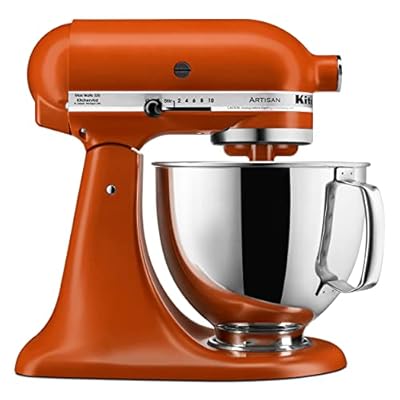
Now, let’s dive into the details of each specification…
Motor and Power: KitchenAid Artisan Wattage and Torque
Let’s be clear: while wattage is essential, it alone does not determine a stand mixer’s power and performance.
For kneading, torque and gear system strength are more important for handling resistance without slowing down.
The KitchenAid Artisan is powered by a 325-watt direct-drive AC motor located overhead.
Let’s dissect that phrase in “bold” to fully understand a stand mixer’s power.
KitchenAid Artisan Wattage
The Artisan is not a heavy-duty stand mixer, but 325 watts is excellent for almost all mixing jobs. I say “almost” because it has limitations when making bread.
If your baking primarily consists of cakes, cookies, quick breads, and pastries, the Artisan will perform well. However, if you frequently make two loaves, bagels, and pizza dough, you may push the Artisan’s limits more often.
What is an AC motor?
AC stands for alternating current. Most electricity delivered to homes and businesses is AC.
Many AC motors, such as those used in most stand mixers, are easy to maintain because they have fewer parts that wear out, and are cost-effective because they are widely produced.
AC motors are great for loads that don’t need precise speed control. It works well for cookies, batters, and frostings, which don’t require frequent speed changes.
The type of motor (AC or DC) influences torque, which we shall discuss next.
What is torque?
Torque is the twisting force that turns objects around. Think of torque like trying to open a stuck jar lid. The more twisting force you apply, the more likely the lid is to turn rather than your hand slipping. A longer grip (or stronger twist) helps you keep turning even when it’s resistant.
When you knead dough in a stand mixer, it pushes back hard as gluten develops and the dough tightens.
A mixer with more torque at low speed can keep the dough hook turning steadily through that resistance; it’s like pedaling uphill in the right gear.
Benefits of Better Torque at Low Speed
- Less stalling or bogging down.
- More consistent kneading motion.
- Less “walking” and straining when the dough becomes heavy.
Wattage hints at potential power, but for kneading, what you see is torque at work—the ability to keep turning under load.
This article dives deep into AC motors and torque.
What is a direct-drive motor?
It’s a system of gears that transfers power directly to the bowl and its contents.
Here are the advantages of a direct-drive motor.
- Reduces power loss by transferring power more efficiently: no belt or other components separate the motor from the mixing mechanism, reducing energy waste.
- It is better for heavy dough because it provides greater torque even at lower speeds.
- It is more durable and requires less maintenance than belt-driven motors because it has fewer moving parts.
- Quieter operation.
Given all the components that influence ‘power’ in a stand mixer—wattage, motor type, torque, and gear system—here’s what the KitchenAid Artisan’s power can and cannot do.
It works well for:
- Cookie dough (for one standard recipe, not doubled)
- Cake batter, brownies, and quick breads
- Buttercream and cream cheese frosting
- Whipped cream and egg whites
- Every day mixing, where the beater maintains a steady pace
It’s not ideal for:
- Frequent kneading of stiff dough (such as bagel or pretzel-style, low-hydration doughs)
- Regularly making large or double batches of heavy dough
KitchenAid Artisan Stand Mixer
- Fast creaming: butter + sugar whip pale and airy, not gritty.
- Cleaner batters: fewer flour streaks, fewer scrape-downs (standard batches).
- Spreadable frosting: silky texture, clean swipes, less re-whipping.
- Less mess, less strain: right batch + speed = less splatter and slowdown.
KitchenAid Artisan Tilt-Head Design: Is It Easy To Use?
The tilt-head design makes baking easier by allowing you to lift the head to add ingredients, scrape the bowl, or change attachments without reaching around the beater.
The bowl of a tilt-head mixer is fixed and locked on the base.
A tilt-head mixer is convenient if you have only one good arm. There is no button to push; simply raise the head backward in one gentle sweep.
Changing attachments is straightforward: just lift the head, remove the current attachment from the beater shaft, and lock in the new one.
Here are a couple of important reminders when using the tilt-head feature:
- Unlock the locking pin before tilting the head.
- Lock the head before running the mixer; otherwise, it will wobble.
To learn more about tilt-head stand mixers, check out this post.
Next, we will explore the maximum capacity a 5-quart bowl can handle before mixing performance begins to change.
Bowl Capacity: How Much Can the 5-Qt Artisan Handle?
A 5-quart bowl accommodates typical “home baking” batches of cookies, cake batters, quick breads, and generous amounts of frosting. The primary limitation you might encounter isn’t simply that the mixture won’t fit; rather, heavier mixtures create more resistance, causing the mixer to slow down, bounce, or operate unevenly.
To help you determine the appropriate batch sizes for the KitchenAid Artisan 5-quart bowl, here’s a practical guide. It outlines what fits comfortably, what works but requires monitoring, and what exceeds the recommended capacity.
KitchenAid Artisan Batch Size Guide
| What you’re making | Recommended Batch Size | Above Recommended | What you’ll notice |
|---|---|---|---|
| Drop cookies (standard thickness) | 2–4 dozen medium cookies | 5–6 dozen medium cookies | More scraping required; mixing slows once mix-ins are added. |
| Very thick cookie dough (cold butter & heavy add-ins) | 1–2 dozen large cookies | 2–3 dozen large cookies | Dough rides the beater; longer mix time and frequent scraping. |
| Cake batter (layer cakes) | 2 × 8"–9" layers | 3 × 8"–9" layers | Uneven mixing unless you stop and scrape the bottom. |
| Cupcakes | 18–24 cupcakes | 30+ cupcakes | Larger batches require staged mixing to stay even. |
| Brownies & bar batter (thick) | 1 full 9"×13" pan | 1.5× 9"×13" (split recommended) | Bottom can lag behind; expect 1–2 scrape-downs. |
| Buttercream or frosting | 12–24 cupcakes or 1 layer cake | Large party-cake quantity | Frosting climbs the beater; texture improves when split. |
| Whipped cream or egg whites | 1–2 cups cream or 4–8 egg whites | 3–4 cups cream or 10–12 egg whites | Very small amounts may not whip well because the whisk won’t fully engage; extremely large volumes can splash and take longer to whip evenly. |
| Soft bread dough (sandwich & rolls) | 1 loaf or 1 roll batch | 2 loaves (double batch) | Dough may climb the hook; frequent resets signal overload. |
| Pizza dough (moderate hydration) | 1–2 pizzas | 3–4 pizzas | Increased vibration and resistance during kneading. |
| Stiff dough (bagels & pretzels) | Small batch only | Not recommended | Bouncing, stalling, and repeated stop-and-scrape cycles. |
How to Use This Batch Size Table
1. Start with the Baseline: Use the recommended batch size as your starting point.
2. Consider Stiffness and Mix-Ins: Remember that stiffness and mix-ins make the dough harder to mix. If you’ve ever hit the “holiday cookie dough wall,” where the dough gets chunky, and the beater struggles, it’s often due to stiffness and extra ingredients, not just the bowl capacity.
3. Watch the Mixer: If the mixer slows down or the head bounces, either split the batch or soften the dough.
4. Mix by Hand: If the bowl looks too full with mix-ins, add them by hand at the end of mixing.
6. Bread Dough: You can usually make soft doughs, like sandwich bread and rolls, in double batches. Beyond that, it may struggle.
Let’s see what mixing speeds match your baking tasks.
Are There Ten Speeds in the KitchenAid Artisan Series?
Yes, there are ten speeds in the Artisan mixer. But, only “Stir”, 2, 4, 6, 8, and 10 are printed. Speeds 1, 3, 5, 7, and 9 are between the printed speeds. You can use them for finer control. And, yes, they are noticeable.
Do you need such fine adjustments in speed control? Not really. The five settings shown are sufficient for most mixing jobs.
Fast speeds may not be attained or maintained with dense loads. Also, differences between speeds at higher settings may not be noticeable with heavy loads, large amounts, or thick consistencies.
The sliding lever speed selector is on the side of the motor head. The lever slides firmly and smoothly.
Be careful when working near your mixer. I once accidentally bumped the speed lever of my 6-quart KitchenAid to speed 8 with my elbow while reaching for something.
Is the slow start slow enough?
The “STIR” or slow start speed runs slowly enough to incorporate the ingredients a bit before moving to a faster speed.
It’s effective in preventing or reducing flour puffs and ingredient splatter.
If you have ever used an electric mixer without a slow start, you know what it’s like with flour and liquid flying off the bowl and into your work area or, worse, into your face.
TIP: Always start on “STIR” each time you add ingredients to the mix.”
Recommended Speeds for Everyday Baking Tasks
This quick reference guide lists speeds for standard recipes, helping you find the right setting without memorizing all ten.
For detailed information on Kitchen Mixer Speed Settings and Their Applications, refer to this guide.
KitchenAid Artisan Speed Guide (Most-Used Settings)
Use this quick speed map for one standard recipe (not doubled). It covers the four speed choices used most often on the KitchenAid Artisan.
| Speed | Best use |
|---|---|
| Speed 1 | Stirring and starting mixes, especially when adding flour, cocoa, or powdered sugar. |
| Speeds 4–6 | Creaming butter and sugar, and mixing most batters until smooth. |
| Speeds 8–10 | Whipping egg whites or heavy cream to build volume. |
| Speed 2 | Kneading with the dough hook. |
You know which tasks suit the Artisan stand mixer; now let’s discuss how well it handles mixing.
Mixing Action and Mixing Efficiency
The KitchenAid Artisan mixer uses planetary mixing, in which the beater spins on its axis while circling the bowl, touching 59 points in one revolution.
Why Planetary Mixing Is Useful
- Recombines ingredients that might otherwise adhere to the bowl and stay at the edges.
- Improves creaming by allowing butter and sugar to be worked through the same contact zone repeatedly.
- Reduces unmixed pockets in batters, particularly flour streaks that can result in dense bites later on.
You will notice the effects of planetary mixing most prominently in creaming, cake batters, and frostings, where even mixing and aeration significantly alter the texture.
If you’d like a detailed explanation of how planetary motion differs from other mixing mechanisms and its importance, please refer to this Planetary Mixing Action guide. It clarifies what planetary mixing can and cannot achieve.
Bowl Coverage: How Effectively It Reaches the Bottom and Sides
While planetary mixing enhances coverage, thick mixtures still typically require occasional scraping. It’s especially true with cookie dough and heavy add-ins.
Simple Visual Checks for Proper Mixing
- Dry flour ring Pause the mixer and scrape down the sides.
- Bottom looks untouched Check beater-to-bowl clearance and batch size. This is a common reason people think their mixer “isn’t mixing the bottom.”
- Thick dough clinging Stop, scrape down the sides, then mix briefly again.
The Scraping Subject
A common issue with most stand mixers is scraping the contents off the bowl.
This is a valid concern because each time you manually scrape or mix, you must unlock the head, lift it, scrape, lower it, and lock it. If you are using the pouring shield, you must remove it first before raising the head. It’s cumbersome to do this several times.
The correct beater-to-bowl clearance is critical for thorough mixing and less scraping.
Setting the correct distance between the beater and the bowl reduces scraping to about once or twice, but does not eliminate it.
If you don’t want to scrape, I suggest you get a Flex Edge beater with flexible scrapers.
Now, let’s see if the 5-quart Artisan mixer delivers on its promise.
Performance: Can the Artisan Handle Various Mixtures Well?
The Artisan 5-quart stand mixer performs well with cookie dough, frostings, cake batters, and whipping cream.
Here’s what my sister and my aunt use their KitchenAid Artisan mixer for:
My sister loves making and decorating layered cakes. She uses a variety of frostings…, including whipped cream, buttercream, boiled icing, fondant, and cream cheese. She also loves concocting her signature pies and pastries, which she usually gives as presents.
On the other hand, my aunt has perfected the “cookie.” The kids in our family always look forward to her Christmas cookies, and she is more than happy to delight them with her attractive and delectable concoctions.

Performance Summary
This performance summary highlights key patterns observed in owner reviews using a standard recipe (within recommended size). Results can vary based on mixture stiffness, batch size, and heavy add-ins.
How the Artisan Performs by Task
- Thick Cookie Dough Dough stiffness and add-ins matter. Standard batches mix well, but consistency can drop with large batches, cold butter, or heavy add-ins like nuts.
- Cakes Results depend on aeration during creaming and gentle mixing after flour. Standard recipes do well; dense cakes are usually under-creaming or overmixing, not a lack of mixing power.
- Buttercream and Frosting Batch volume affects circulation. Standard amounts mix smoothly, but large batches may sit high in the bowl and not circulate well.
- Whipped Cream and Egg Whites Moderate amounts whip faster. Small amounts can take longer because they sit below the whisk’s reach.
Let’s move to the million-dollar question most people ask when sizing up a stand mixer.
Is the KitchenAid Artisan Good for Bread Dough?
It kneads bread dough. But there’s a catch: use it occasionally or intermittently. Two loaves at a time are ideal, enough for two to three people who don’t feast on bread.
Some owners do not recommend it for dry, stiff dough as it labors, strains, and shakes.
Dough Types Best Suited for the Artisan:
- Enriched doughs (like rolls and buns) are softer and easier to knead.
- Soft sandwich bread kneads smoothly in a single batch.
- Moderate-hydration pizza dough is acceptable but challenging in larger sizes.
Dough Types That Strain the Artisan
- Stiff, low-hydration doughs (bagels, pretzels) create high resistance.
- Lean dough becomes more difficult to work with in larger batches because it tightens as it develops gluten.
Here are the signs that you’re kneading dough more than what the Artisan can handle:
Signs of Overloading
- Dough climbs the hook, forcing resets.
- Mixer slows down or stalls.
- The head bounces, or the mixer shifts on the counter.
ALERT!
Here are a few reminders for using your Artisan KSM150P mixer for bread.
- NEVER, EVER exceed Speed 2 for bread dough and other thick batters, such as a double batch of thick cookie dough. Sticking to a low speed may be the most important step to protecting your mixer’s motor.
- Be careful. One owner accidentally swept the speed control lever to a higher setting, damaging her mixer.
- Observe a maximum mixing time of 3 to 4 minutes.
Tip!
Kneading dough with a stand mixer is different from doing it by hand. You may have to alter the recipe, use a different technique, or change the procedure slightly. It might take a few trials to achieve the desired result.
If you regularly make bread and want a mixer suited to your volume, read this guide: Best Stand Mixer for Bread Dough.
Accessories Included (Standard Tools) and Upgrade Picks
Included in the box are the following Kitchenaid Artisan mixer accessories:
- Coated Flat Beater for beating, blending, and general mixing.
- Aluminum Wire Whisk incorporates air into cream, butter, and egg whites to create a fluffy texture.
- Coated C-Dough Hook for kneading dough for bread and pizza.
- Stainless Steel 5-quart Bowl with handle
- Plastic Splatter Shield guards against splashes and flour clouds.
The bowl with a handle is easier to manage and move. It reduces wrist, hand, and finger fatigue, especially when the bowl is almost full.
Transferring batter from a bowl without a handle and scraping off what clings to its sides can be annoying. The bowl swings, and you have to hold it tighter to prevent it from moving, which puts more pressure on your wrist and hand.
Let me tell you…The pouring shield has made my baking life easier.
Without it, I have to time the instance when I add powdered ingredients so they don’t fall into the turning beater. You know what happens if they do: flying powdery clouds.
With a splatter shield, there is one less thing to mind.
However, some people are irked that it does not fit snugly on the bowl and just sits on top. It dislodges with a slight bump, which is true, and another thing to consider.
There is a reason for the loose fit: it is quicker to remove and put back when you have to scrape the batter off the bowl. If it fits tightly, you’d have to use both hands to remove it and put it back. It will depend on individual preference.
Recommended Upgrades
These extras, which you can purchase separately, make baking even more convenient:
- Flex-Edge Beater: Reduces scraping, available for specific bowl sizes. –
- Extra Bowl: Facilitates multitasking while baking.
- Bowl Scraper: Speeds up scraping.
Find out next what else you can do with a KitchenAid 5-quart Artisan.
KitchenAid Artisan Attachments: What’s Worth Buying?
The Artisan stand mixer features a power hub located at the front (under a small cover) that enables the use of optional attachments powered by the mixer’s motor.
Do all power hub attachments fit the Artisan?
Yes, KitchenAid-branded attachments fit the power hub of KitchenAid stand mixers, including the Artisan model.
With attachments, you can turn your Artisan mixer into an ice cream maker, a pasta maker, a grain mill, a juicer, a fruit or vegetable slicer, etc.
They are not included with the main mixer unit but can be purchased separately.
You can’t get them in one package, which gives you flexibility. You can spend on what you want, need, or can afford, and can always buy more later if your needs change or when you have the money to spare.
Some, like the various pasta attachments, are available in sets if you want to save a bit.
Here are some of the top attachments that many people find valuable as first purchases:
Best KitchenAid Attachments
- Pasta Roller and Cutter Set: Ideal for making pasta sheets and cutting noodles without hand-rolling.
- Food Grinder: Useful for creating burgers, meatballs, or dumpling fillings, and control over grinding texture.
- Slicer/Shredder: Great for those who do a lot of food prep (including cheese, carrots, potatoes, and cabbage) and prefer quick slicing or shredding.
- Grain Mill: A worthwhile investment if you bake with freshly milled flour or grind grains regularly.
- Spiralizer: A good choice if spiralized vegetables is a frequent part of your meals.
If pasta is on your list of priorities, my KitchenAid pasta attachments guide details which attachment is best suited for the type of pasta you want to create (roller/cutter versus press) and provides insights on setup and cleanup.
Small space? Under cabinet storage? Will it fit your space? Get the answer next.
Size, Storage, and Aesthetics
The Artisan is a full-size stand mixer. You have to consider counter space, cabinet clearance, and weight before bringing home one.
Counter Footprint and Height
Setup Fit: Counter Space and Clearance
Plan for base space (the mixer footprint) and head clearance (room to lift the tilt head).
Best placement is an open counter run where the head can lift fully and the bowl area stays easy to access.
The dimensions are approximately 8 ¾ inches wide, 13 15/16 inches high, and 14 1/8 inches deep.
You’ll want extra space in front for the bowl, spatula, and measuring cups.
With the head raised, the total height is around 17 ½ inches.
Weight and Storage
The Artisan typically weighs around 26 pounds, which is manageable to lift but not something most people enjoy moving daily. In practice, it either needs a dedicated space on your counter or in storage with convenient access.
Optimal storage setups include:
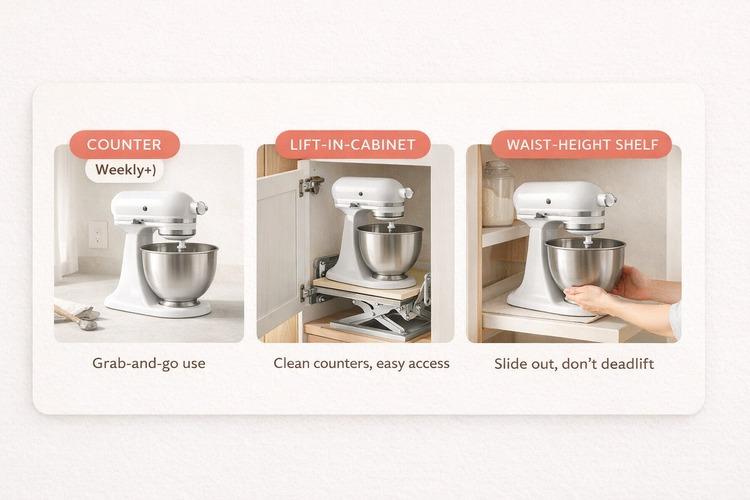
Keep in mind that the cord length is usually around 3 to 4 feet, so outlet placement is important. A short cord can turn a “quick bake” into a tangled mess across your prep area.
Aesthetics, Colors, and Finish
Many people choose the Artisan line for its stylish design and variety of colors.
It is one of the most wished-for kitchen gadgets on brides’ wedding registries.
It’s not hard to see why. It has the widest selection of shades (39): bold reds, fiery pinks, dainty greens, sunny yellows, and more.
One of the most sought-after KitchenAid Artisans is the pink one. Other popular colors are ice blue, grape, onyx, and white.
Glossy finishes show flour dust and fingerprints more than matte ones, but a damp microfiber cloth can easily clean them without scratches.
The main body is metal, while some trim and accessories are plastic, which may show wear sooner.
Let’s find out where the Artisan stand mixer lands on the noise scale.
Noise Level: Is the KitchenAid Artisan Loud?
On the Artisan stand mixer, the noise levels vary by speed. At low and medium speeds, the sound is similar to that of a typical stand mixer. However, high-speed whipping is the loudest, and working with thick dough can increase vibration.
Sound Levels by Speed
Low Speeds (1–2): Produce the lowest noise. However, kneading stiff dough can create more vibration.
Medium Speeds (4–6): Noticeably louder, commonly used for creaming and mixing batters.
High Speeds (8–10): These are the loudest and are typically used for whipping.
What Is A Quiet Stand Mixer?
“Quiet” usually means that the mixer is acceptable at low and medium speeds, but not silent at high speeds.
Normal stand mixer noise consists of a steady motor sound that increases with speed, accompanied by additional mechanical noise at higher speeds.
Tips to Reduce Noise
- Use an anti-vibration mat and place the mixer on a solid countertop.
- Stick to one standard recipe for thick doughs rather than doubling it.
- Use low speeds for kneading and reserve high speeds for whipping.
Stability: Does the Artisan “Walk” on the Counter?
“Walking” is when the mixer creeps across the counter like it’s doing a slow sidestep while it runs.
With the Artisan mixer, it’s most common during kneading as dough creates more resistance than batters or whipped mixtures. Increased resistance leads to greater vibration, which causes the base to move.
When the Mixer Creeps or Bounces
The Artisan mixer generally remains stable when mixing batters and frostings. However, movement tends to occur when the load is heavy or if the surface amplifies vibrations.
When kneading stiff dough at Speed 2, the tilt-head can bounce, causing creeping. This issue is exacerbated when working with larger or double batches, as resistance increases rapidly.
Very low-hydration doughs, such as those for bagels or pretzels, are common triggers for this problem. Additionally, placing the mixer on a thin table or rolling cart can worsen the situation due to flexing, and uneven surfaces make it easier for the base to shift.
How to Prevent a Mixer from Walking
Here are some simple solutions to prevent the mixer from walking:
Stop the Mixer From “Walking”
- Stabilize the surface: Use a solid, heavy countertop and avoid wobbly tables.
- Add grip: Place an anti-vibration mat under the mixer to improve traction and dampen vibrations.
- Reduce load: Knead at Speed 2 and stick to one standard recipe (avoid doubling).
You can use this link to find the right service options for your model and location: KitchenAid Repair Finder.
Care and Cleaning
All KitchenAid Artisan accessories are dishwasher safe. But, before you use the mixer, there’s one thing you should do to avoid frustration.
What is it?
An issue with some people who bought this product is that…
…their batters or dough turned grey during their first attempts. Several washings and scrubbings with soap and water proved futile.
Why? A special coating covers the bowl, and you can’t remove it with ordinary washing.
How do you get rid of the blackish stuff?
Scrub it using one of the following recommendations:
- A mixture of lemon juice and salt;
- Baking soda paste;
- BarKeeper’s Friend.
Customers point out that the manual or the box needs to include this instruction.
Unplug the unit after use and before cleaning. Wipe it with a damp towel and clean the accessory shaft.
Cleaning your mixer after each use and after a long period of idleness will prevent dirt from building up and clogging vents, extending your mixer's usable life.

Next, we will compare specifications and performance claims with feedback from actual users.
Customer Reviews (Praises vs Complaints)
Moat owner reviews revolve around a few recurring themes. The positive feedback mainly highlights everyday baking performance and usability, while the complaints often focus on dough handling, stability, and the setup and maintenance of the mixer.
Common Praises from Owners
These points frequently appear as reasons why owners chose this mixer:
- Strong Everyday Baking Performance: Excellent results for cakes, cookies, frosting, and whipping at standard batch sizes.
- Versatile Attachment Hub: The ability to add functions like pasta-making, grinding, or slicing without needing another appliance.
- Tilt-Head Convenience: Easy access to the bowl and tools during scraping and adding ingredients.
- Stable Results for Everyday Tasks: Reliable creaming, batter mixing, and whipping when the bowl is properly engaged, ensuring consistency in batch results.
Most Common Complaints
These complaints generally relate to specific use cases:
- Oil/Grease Leak: This issue most often affects mixers that are left unused for long periods or stored in warmer conditions.
- Wobbling or “Walking” During Kneading: Usually occurs with heavy or stiff dough and large or double batches, particularly on lightweight tables or carts.
- Uneven Mixing at the Bottom: Often affects small batches, thick mixtures that climb the beater, or mixers that need a beater-to-bowl clearance check.
- Noise at High Speed: Most noticeable for those who frequently whip frostings or egg whites, or for those who prefer a quieter kitchen environment.
Avoidable Complaints
The following issues can be prevented by adjusting usage procedures, frequency of use, and setup rather than trying to “fix” the mixer:
- Overload-Related Complaints: Minimized by keeping dough and thick mixtures to one standard recipe (not doubled) most of the time.
- Kneading-Related Movement: Reduced by kneading at Speed 2 and limiting use for stiff dough.
- Bowl-Contact and Uneven Mixing Complaints: Diminished by ensuring the bowl is seated correctly, scraping as needed, and using the appropriate accessory for the mixture (a flex-edge beater can help reduce the need for scraping for many batters and frostings).
KitchenAid Artisan Stand Mixer Review: Pros and Cons
This Pros and Cons table outlines the main strengths and trade-offs of the KitchenAid Artisan for everyday baking. Use it to determine whether it suits your baking needs.
Price, Warranty, and Support
In the U.S., the KitchenAid Artisan stand mixer typically falls in the mid- to high-price range. Prices vary based on factors such as sales timing, color choices, and whether you opt for a new or certified refurbished model.
The Artisan usually lists around $499.99, often dropping to the mid-$300s during promotions.
Price Factors
- Sales Timing: Prices can fluctuate from $499.99 one week to around $349.99 during sales.
- Color and Editions: Certain colors or bundles may cost more than the baseline price (TechRadar).
- Refurbished Options: Certified refurbished models are usually cheaper when available (KitchenAid).
If you're flexible on color, waiting for a promotion is a good way to save money.
Warranty and Support
New KitchenAid mixers come with a one-year limited warranty from the purchase date (KitchenAid). Support includes product registration, troubleshooting, and help with warranty services.
Refurbished vs. New
KitchenAid’s certified refurbished mixers offer good value, often at a lower price, and are backed by a 6-month or 1-year warranty.
In summary, choose refurbished for better discounts and new when you want a specific color or bundle.
KitchenAid Artisan Alternatives
If the Artisan doesn’t suit your workload, consider your specific needs. Some prefer a lower-cost tilt-head for standard baking, while others need the stability of a bowl-lift for frequent kneading or larger batches, especially when baking bread.
KitchenAid Artisan vs. Classic: Both are tilt-head mixers, but the Classic (4.5 qt, 275W) is smaller, making it ideal for standard batters and smaller batches. The Artisan (5 qt, 325W) offers more space for thicker mixes.
If you bake smaller batches and want a more affordable tilt-head mixer, the Classic is often the better choice.
See full comparison of KitchenAid Artisan vs Classic here.
Go here for the full review of the KitchenAid Classic.
When to choose a bowl-lift: Opt for a bowl-lift if stability and the ability to knead larger loads are concerns. This design has a fixed head and bigger motors, making it suitable for heavy dough and large batches.
Budget-friendly alternatives:
Breville Bakery Chef: Tilt-head, usually includes multiple bowls and a scraper beater.
Cuisinart Precision Master SM-50: Larger bowl, more speeds, and common accessories included. See full review.
Bosch Universal Plus: Designed for frequent bread making. Read this detailed review.
Ankarsrum Assistent: Higher budget option built for larger dough batches.
For those focused on bread performance, refer to the Best Stand Mixer for Bread Dough guide to match mixer type to your baking frequency and batch size.
Next, let's make it easy for you to size up the KitchenAid stand mixer
Who Should Choose the KitchenAid Artisan 5-Qt Tilt-Head?
The Artisan mixer is a great choice for home bakers who often make desserts and need a reliable mixer for standard recipes.
Should you get one? Below is a quick decision guide for you.
Is the Artisan the Right Fit?
- You primarily bake cakes, cookies, muffins, and quick breads.
- You make frosting or whipped mixtures and want consistent results.
- You occasionally knead dough with one standard recipe.
- You want to use attachments to replace other appliances.
- You prefer a tilt-head design for easy bowl access.
- You knead bread dough weekly, especially lean types.
- You make stiff doughs, such as bagels or pretzels.
- You often work with large or double batches or very heavy mixtures.
- You need maximum stability, which bowl-lift models better provide.
If you want a KitchenAid for bread, read this detailed review of the KitchenAid 7-quart bowl-lift mixer.
Best for Beginners and Intermediate Bakers:
The Artisan suits both beginners and intermediate bakers.
Beginners will find it easy to use with simple controls and a 5-quart bowl for standard recipes.
Intermediate bakers can rely on it for everyday desserts while using attachments for more advanced tasks as they grow in their baking skills.
If you're comparing KitchenAid Stand Mixers, go to this full comparison guide.
Does the Artisan Fit Your Baking Routine?
If you opened this review asking, “Will the KitchenAid Artisan keep up with my baking?” you have your answer now.
You now know what it handles well, and you can spot the warning signs when you’re asking too much of it.
If your week-to-week baking is cookies, cakes, frosting, and whipped mixtures, the Artisan can be the mixer that earns its counter space.
Imagine creaming butter and sugar into a light, airy mass, mixing batter evenly, and finishing with frosting that spreads in clean, silky swipes.
If bread and big dough are your regular workload, you’re not “doing it wrong.” You just need a mixer built for heavier kneading and larger batches, and you now know which one to choose.
Pick the mixer that matches how you bake most weeks. If the Artisan fits, use the batch-size guide and stick to Speed 2 for dough. If it doesn’t, head to the alternatives and choose the option that will handle your routine with less strain.
Ready to Choose Your Artisan Setup?
- Buy with confidence today: match your baking routine to the right model and bundle.
- Catch the best price window: sales change fast, and popular colors go first.
- Avoid the wrong fit: skip the “returns + regret” cycle by choosing based on batch size and dough load.
- Get started immediately: pick the bowl/tools you’ll use weekly, not the extras you won’t.